


Linux for Kids Bootable USB [8GB] – Educational Zorin OS with STEM & Learning Apps [32GB]
Linux for Kids Bootable USB [8GB] – Educational Zorin OS with STEM & Learning Apps [32GB]
Couldn't load pickup availability
Give kids a safe, distraction-light computer they can learn on — straight from a USB. This Linux for Kids USB boots a child-friendly Zorin OS Education desktop with curated learning apps, creativity tools, and offline activities. No installation required; keep your main system untouched while kids explore.
🧸 What Kids Can Do
- Create: draw, paint, make simple slideshows, and record audio.
- Learn to code: beginner-friendly, block-style coding and logic puzzles.
- Explore STEM: math drills, typing tutors, and science/logic apps (varies by build).
- Write & research: kid-friendly office tools and a privacy-respecting web browser.
- Practice digital skills: basic file management, safe browsing habits, and simple projects.
📦 What's Included
- Bootable Linux for Kids USB with a child-friendly Zorin OS Education desktop (Live system — no install required).
- Dual USB-A / USB-C connector flash drive (USB 2.x, works in USB 3.0 ports).
-
Preloaded learning & creativity apps such as:
- Drawing/painting and simple image tools
- Typing practice and basic office apps
- Block-style coding and logic/maze games
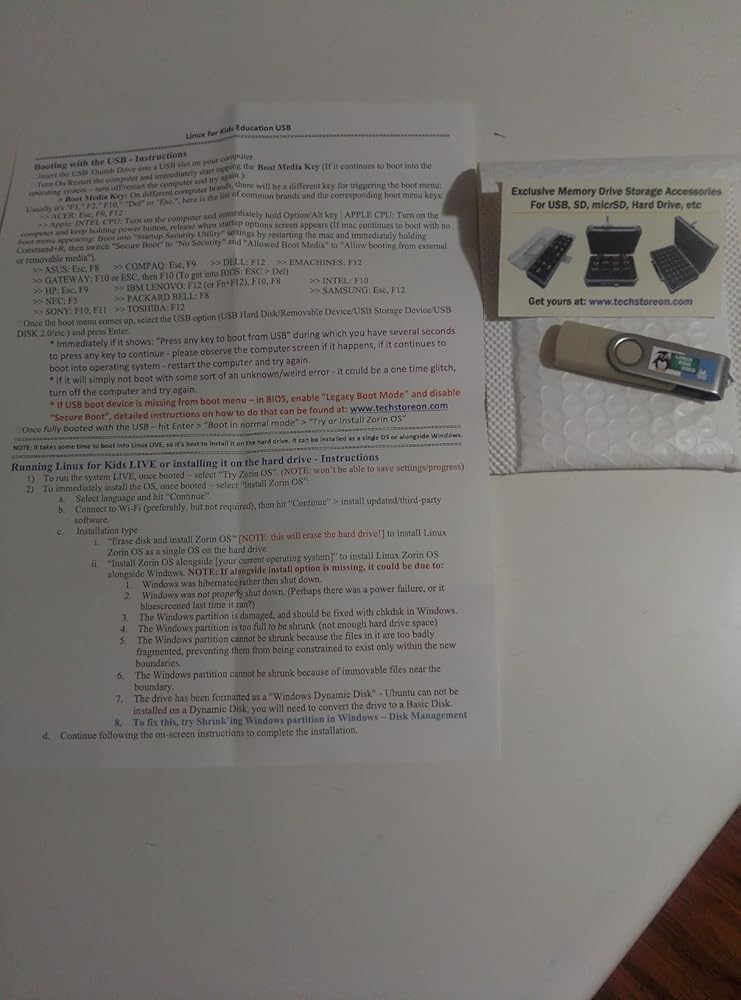
- Quick-start guidance for parents/teachers: how to boot, set language/keyboard, connect Wi-Fi.
- Packaging: standard (Clear Box) or gift (Tin Case) (select above).
💻 Compatibility & Requirements
- Systems: 64-bit (x86_64) PCs that can boot from USB (UEFI or Legacy BIOS).
- RAM: 4 GB or more recommended for a smoother experience.
- Optional install: 20 GB+ free internal storage suggested if you decide to install.
- Secure Boot: some PCs may require disabling Secure Boot to start from USB.
- Not for ARM-only devices or Apple M1/M2/M3 Macs.
⚙️ How to Boot
1. Insert the USB into the PC (USB-A or USB-C).
2. Power on and press your boot-menu key (F12, Esc, F10, F2, Del, etc.).
3. Select the USB drive, then choose the kids desktop/session from the menu.
4. Follow on-screen prompts to set language, time, and keyboard; connect to Wi-Fi if needed.
Help & Tutorials:
help.techstoreon.com — boot keys, USB booting guides, and troubleshooting.
🎨 Customizing the Kids Desktop
You can adjust the look and feel of the kids environment (wallpapers, panels, favorite apps) and fine-tune what ’s available to them.
- Create a dedicated user account just for kids.
- Pin favorite apps (drawing, coding, office) to the panel or desktop.
- Hide more advanced tools from younger children.
See our step-by-step customization guide:
Customizing Linux for Kids (Zorin OS)
👨👩👧 Parent & Teacher Tips
- Use timed sessions (e.g., 30–60 minutes) with a clear project goal.
- Encourage kids to save drawings, stories, and code projects in a “Kids Projects” folder.
- Start younger kids with creativity and typing apps before moving into coding.
- For schools, test on one lab PC first to confirm boot keys and compatibility, then roll out to others.
- For installs, always back up family or student data first — Live mode is safest for just trying things out.
🛠️ Support
Need help booting on a specific PC or choosing activities by age? Message Us.
⚠️ Practical & Supervision Notes
Designed for learning at home and in classrooms. Adult supervision is recommended for young children, especially when using the web browser or installing software. You are responsible for complying with school, family, and device policies.
Share
![Linux for Kids Bootable USB [8GB] – Educational Zorin OS with STEM & Learning Apps [32GB]](http://www.techstoreon.com/cdn/shop/files/X004CAJCZT.MAIN.png?v=1764790718&width=1445)
![Linux for Kids Bootable USB [8GB] – Educational Zorin OS with STEM & Learning Apps [32GB]](http://www.techstoreon.com/cdn/shop/files/X004CAJCZT.PT01.png?v=1764790718&width=1445)
![Linux for Kids Bootable USB [8GB] – Educational Zorin OS with STEM & Learning Apps [32GB]](http://www.techstoreon.com/cdn/shop/files/0_USB_APPS_SUPPORTED_PCs.jpg?v=1768673310&width=1445)
![Linux for Kids Bootable USB [8GB] – Educational Zorin OS with STEM & Learning Apps [32GB]](http://www.techstoreon.com/cdn/shop/files/USBapps_customizing_represent_demo.jpg?v=1769889702&width=1445)
![Linux for Kids Bootable USB [8GB] – Educational Zorin OS with STEM & Learning Apps [32GB]](http://www.techstoreon.com/cdn/shop/files/X004CAJCZT.PT02.png?v=1767118359&width=1445)
![Linux for Kids Bootable USB [8GB] – Educational Zorin OS with STEM & Learning Apps [32GB]](http://www.techstoreon.com/cdn/shop/files/X004CAJCZT.PT03.png?v=1767118359&width=1445)
![Linux for Kids Bootable USB [8GB] – Educational Zorin OS with STEM & Learning Apps [32GB]](http://www.techstoreon.com/cdn/shop/files/X004CAJCZT.PT04.png?v=1767118359&width=1445)
![Linux for Kids Bootable USB [8GB] – Educational Zorin OS with STEM & Learning Apps [32GB]](http://www.techstoreon.com/cdn/shop/files/X004CAJCZT.PT05.png?v=1767118359&width=1445)
![Linux for Kids Bootable USB [8GB] – Educational Zorin OS with STEM & Learning Apps [32GB]](http://www.techstoreon.com/cdn/shop/files/education_apps_laptop_zorinos_chemistry_elements.png?v=1767118359&width=1445)
![Linux for Kids Bootable USB [8GB] – Educational Zorin OS with STEM & Learning Apps [32GB]](http://www.techstoreon.com/cdn/shop/files/education_apps_laptop_zorinos_space_learning.png?v=1767118359&width=1445)
![Linux for Kids Bootable USB [8GB] – Educational Zorin OS with STEM & Learning Apps [32GB]](http://www.techstoreon.com/cdn/shop/files/z_aio_zorinos_gaming_example_3.png?v=1767118359&width=1445)
![Linux for Kids Bootable USB [8GB] – Educational Zorin OS with STEM & Learning Apps [32GB]](http://www.techstoreon.com/cdn/shop/files/BANNER_good_showoff_aio_desktop_zorinos_examples.png?v=1767118359&width=1445)
![Linux for Kids Bootable USB [8GB] – Educational Zorin OS with STEM & Learning Apps [32GB]](http://www.techstoreon.com/cdn/shop/files/Heroic_Games_Launcher.png?v=1767118359&width=1445)
![Linux for Kids Bootable USB [8GB] – Educational Zorin OS with STEM & Learning Apps [32GB]](http://www.techstoreon.com/cdn/shop/files/education_apps_laptop_zorinos_learning_earth_planet.png?v=1767118359&width=1445)
![Linux for Kids Bootable USB [8GB] – Educational Zorin OS with STEM & Learning Apps [32GB]](http://www.techstoreon.com/cdn/shop/files/education_apps_laptop_zorinos_minecraft.png?v=1767118359&width=1445)
![Linux for Kids Bootable USB [8GB] – Educational Zorin OS with STEM & Learning Apps [32GB]](http://www.techstoreon.com/cdn/shop/files/z_aio_zorinos_gaming_example_1.png?v=1767118359&width=1445)
![Linux for Kids Bootable USB [8GB] – Educational Zorin OS with STEM & Learning Apps [32GB]](http://www.techstoreon.com/cdn/shop/files/z_aio_zorinos_gaming_example_2.png?v=1767118359&width=1445)
![Linux for Kids Bootable USB [8GB] – Educational Zorin OS with STEM & Learning Apps [32GB]](http://www.techstoreon.com/cdn/shop/files/USBBAP13_thumbdrive_USB_with-tin-case_2.png?v=1767118359&width=1445)
I'm already familiar with the Zorin operating system which is a Linux derivative. I've never used the education OS before, but it's a great operating system. It's the basic Zorin OS (not Pro) with a few extra applications tweaked towards education, ya know, helping ya learn stuff. I've been moving away from Windows due to no support in the near term which is hardware related. I'm on a fixed income and don't have extra cash for a new computer, Linux has been a lifesaver for me. I'm currently typing this on a 16 year old PC running Zorin OS. If you like ZorinOS it's free to download an install directly from their website. This seller has made things super easy for you, everything's already done for $20. Updates are automatic or you can choose which you want. Linux is all about choice and Zorin is about the easiest operating system to try or install on your desktop PC, laptop and or deploy in a corporate scenario. Linux isn't like it used to be friends; if you use Windows, you can easily use ZorinOS. Keep your old computers out of the trash heap by installing ZorinOS, you'll be surprised at how far Linux has come with this operating system. With Zorin installed the pc will work much quicker, however just to get a feel for the OS, run it for a test drive. You'll be pleasantly surprised.btw: i don't know this seller, but I do know Zorin and I approve of this OS as a daily driver. An easy to follow directional sheet is provided with your ZorinOS USB stick. What are you waiting for, buy it today and breath life to that dinosaur hiding in your closet! I realize you can do this for free, but seriously it's only $20 and it can be installed within minutes, not hours or days.



This is a really good place to start a kid down the STEAM path, it includes a lot of fun tools, toys, games, features, apps to learn and create, but I think the choice of Zorin OS wasn't the best to transition kids from touch based OSs to point and click OSs. In my opinion popOS would have been a better pick as it is a nice middle ground between touch and mouse based inputs helping kids be more used to using the keyboard and terminal which they absolutely will have to do in Linux
I firmly believe in introducing kids with Linux and the programming examples it gives. This is a standard distribution with a ISO and setup program. I didn't want to overwrite any of my computers so I downloaded Oracles VirtualBox and set it up as a new device. The ISO is a standard "Live DVD" that gives you the option to give it a test run or install it. Once it was installed, it was well polished windows manager with everything setup, including the manual, FAQ, and Howto's setup either locally and online. it even set things up and updated as soon as it connected to the internet. My opinion is that this is reproducible by downloading an ISO, but having a bootable USB key and the support of a third party at a great price makes it worth while.

Zorin is available as a free download, but this has two advantages: 1) it’s very easy to use, and 2) it is tweaked for further educational purposes. Also, it’s a very good price.Also, it comes with a tiny but very useful manual that helped me through problems when using it on an old Mac iBook.
First let me say that I overly appreciate the fact that this comes with a little guide that helps you through common problems. I ran into the security issue problem and then was able to use the little pamphlet that came with it to figure out that I needed to go into Legacy instead of ufci boot. Once I got this set up it was super awesome and looks great. I'm going to have a lot of fun dealing with my child and learning how to use this. This seems to be a really good way to dip into the world of Linux and you can either use this as a live boot device which means you can't really save restore anything or you can actually load this and install it onto a hard drive either alongside your windows or in place of Windows. This is a fantastic item at a great price and I'm happy to see that this is available.